




Hands typing on a laptop with digital icons floating over the fingers of an email, mobile phone, and security icon

Spot the Signs. Protect Your Finances.

Stay informed about common and emerging scams, know the warning signs to watch for, and discover practical ways to help protect your money and personal information.

Need to report fraud? Call Our Member Contact Center

Impersonation Scams to Watch For Right Now

Scammers may pretend to be someone you know or trust to trick you into sharing personal information or sending money. Scroll through the cards to explore common impersonation scams happening now, learn the warning signs, and understand what to watch for.

TruStage Impersonation Calls

We are aware of scam calls from individuals pretending to represent our insurance partner, TruStage®.

St. Mary’s Bank and TruStage will never call to request your online banking credentials or one-time passcodes. Be cautious if someone asks for sensitive account information or pressures you to make an immediate payment. If you receive a suspicious call, hang up and contact us directly using a trusted phone number.

  • Never share your account numbers, online banking login details, passwords, or one-time passcodes in response to an unexpected call.
  • If a call seems suspicious, hang up. You do not need to stay on the phone or respond to pressure.
  • Be cautious if someone demands immediate payment, threatens consequences, or tries to rush your decision.
  • If you have questions or are unsure whether a call is legitimate, contact us directly at 1-888-786-2791.
  • Access digital banking through the official St. Mary’s Bank mobile app or by typing our website address directly into your browser and selecting the login button.
Expand Close

Fake Text Messages

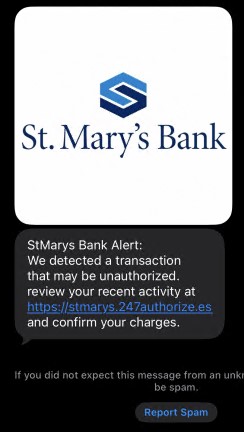
Scammers may send text messages pretending to be from St. Mary’s Bank and direct members to fraudulent websites designed to look like our online banking login page. These sites may be used to steal your online banking username, password, or security codes.

❌ Avoid clicking links in unexpected text messages or entering your username, password, or verification codes on a website reached through an unsolicited message. Even if a website looks legitimate, it may not be affiliated with St. Mary’s Bank.

What to do:

  • Access digital banking through the official St. Mary’s Bank mobile app or by typing our website address directly into your browser and selecting the login button.
  • Never share your online banking password or one-time security codes in response to unexpected texts or through unfamiliar websites.

Expand Close

Fake Business Calls

Scammers may call businesses pretending to represent St. Mary’s Bank and ask to speak with someone in Accounts Payable. They may claim there is suspicious account activity and mention a specific dollar amount or name to make the call sound legitimate.

Once they have gained your trust, they may ask for:
❌ Account numbers
❌ Online banking user IDs or login details
❌ One-time security codes

St. Mary’s Bank will never call to ask for your online banking password or one-time security codes. If you are unsure whether a call is legitimate, verify it independently before sharing information or taking action.

What to do:

  • Do not share account numbers, login details, passwords, or one-time security codes in response to an unexpected call.
  • If a call seems suspicious, end the call. You do not need to stay on the phone or respond to pressure.
  • Contact us directly using the phone number on your account statement or our official website to verify the call.
Expand Close

Financial Scams: Know What to Look For

Explore these interactive cards to learn about common financial scams, including fake deposit schemes, tech support scams, and phishing attempts. Discover the warning signs, understand how these scams work, and learn simple ways to help protect your money and personal information.

Fake Law Firms Targeting Crypto Scam Victims

Scammers may pose as law firms or government agencies and claim they can recover cryptocurrency lost to fraud. These recovery scams can cause further financial loss by taking more money or personal information from people who have already been targeted.

Red Flags to Watch For:

  • They know details about a previous scam and use them to gain your trust.
  • They pressure you to stay on the phone, act quickly, or follow their instructions without checking with anyone else.
  • They claim to be an “authorized partner” of a government agency. Treat these claims with caution and verify them independently.
  • They use official-sounding names for agencies that may not exist or impersonate legitimate organizations, such as the Federal Trade Commission (FTC).
  • They ask you to pay fees using cryptocurrency or gift cards.
  • They ask you to join WhatsApp groups or other chats and may insist that you keep the conversation secret.
  • They pressure you to open bank accounts or send money to other people or businesses.

Protect Yourself:

  • Be cautious of unexpected calls, messages, or emails offering to recover money or cryptocurrency.
  • Verify a lawyer’s credentials and any claimed government affiliation using independent, official sources.
  • Do not pay recovery fees in cryptocurrency or gift cards, and be wary of requests for upfront payments.
  • Be honest with your financial institution about why you are withdrawing or transferring money. Never let someone pressure you into providing a false explanation.
  • If someone claims to be working with your financial institution or a government agency, contact the organization directly using a trusted phone number. Do not rely on contact information or links supplied by the person who contacted you.

You can report suspected online scams to the FBI’s Internet Crime Complaint Center (IC3) at ic3.gov.

👉 Learn more: FBI Public Service Announcement

Expand Close

Fake Deposits and Check Scams

Deposit scams often involve receiving money that appears legitimate and being asked to send some of it to another person. Later, the original payment may turn out to be fraudulent, leaving you responsible for the money you sent.

Scammers may use checks that look like cashier’s checks from real banks, U.S. Postal Service money orders, or other forms of supposedly “guaranteed funds.” They may also ask for your online banking credentials to arrange a deposit or receive payments. Never share your online banking username, password, or one-time security codes.

A check may take several business days or longer to be identified as fraudulent, even if the funds appear in your account or are initially made available. If the check is later returned unpaid, you may be responsible for the amount you sent or spent. Contact your financial institution if you are unsure whether a payment is legitimate.

Common Deposit Scam Warning Signs

  • You receive an online job offer that involves cashing checks, depositing money, or forwarding payments. Examples may include mystery shopping, interpreting, car-wrap advertising, or cashing checks for an overseas company.
  • You sell something online, and the buyer sends more than the agreed price or extra money for a supposed shipping agent, then asks you to send the difference elsewhere.
  • You are told you have won a foreign lottery or prize but must pay taxes or fees upfront to receive your winnings.
  • Someone you have met online offers to send you money and asks you to transfer it to another person or invest it on their behalf.
  • A prospective roommate sends you a check for rent or expenses, then claims there has been an emergency and asks you to return some or all of the money before the check is confirmed as legitimate.
Expand Close

Tech Support and PC Repair Scams

You may receive an unexpected call, email, or pop-up message claiming your computer has a virus or that suspicious activity has been detected. The message may urge you to call a phone number, click a link, pay for unnecessary protection, or allow someone remote access to your computer. These are common tactics used in tech support scams.

Be cautious of unexpected virus alerts that ask you to call a phone number, make a payment, or give someone remote access to your device. Scammers may use alarming messages or pretend to represent a trusted technology company to gain your confidence. If you are concerned about your computer, contact a reputable support provider using contact information you find independently, rather than information provided in the alert.

Expand Close

Phishing Emails and Fake Websites

Phishing messages are designed to trick you into sharing personal information or clicking a link. An email or text may claim you need to protect your account, unlock access, or prevent fraud urgently. The link may lead to a fake website that looks like a legitimate one but is designed to steal your login details or other sensitive information. If a message concerns your account, do not use the links or phone numbers it provides. Instead, contact the organization using a trusted phone number or website you find independently.

Some phishing links may also download harmful software onto your device or direct you to websites that try to steal your information. Keeping your operating system, browser, and security software up to date can help reduce these risks.

Don't Get Hooked

Be cautious with unexpected emails and messages, especially those that ask you to act quickly, share personal information, or open an attachment. Avoid clicking suspicious links or opening unexpected attachments. If you need to verify a message, contact the organization using a trusted phone number or website.
You can hover over a link on a computer to preview its destination, but remember that a convincing-looking address is not proof that a site is safe. When possible, use a saved bookmark or type the official website address directly into your browser.

Look closely at the sender's email address and website links for misspellings, extra characters, or unusual domains. For example, a fraudulent address may resemble a familiar company name but contain subtle differences. When in doubt, do not click—verify the message independently.


Expand Close

Everyday Habits for Staying Safe From Scams

Staying informed is one of the best ways to help protect yourself from fraud. These 10 simple do’s and don’ts can help you recognize suspicious activity, keep your information secure, and make confident decisions when something doesn’t seem right.

  1. Do turn on online banking alerts for account logins and transaction activity so you can keep an eye on your accounts.
  2. Do use a saved bookmark or the official St. Mary’s Bank app to access online banking. Search results can sometimes lead to websites designed to look like the real thing.
  3. Do take a moment to verify unexpected requests for money from family or friends, especially those involving mobile check deposits, photos of checks, Cash App, Venmo, or other payment apps.
  4. Do create strong, unique passwords or passphrases for your financial accounts and email, and enable multi-factor authentication whenever it’s available.
  5. Do keep the devices you use for online banking up to date, including your operating system, browser, and security software.
  6. Don’t feel pressured to explain a withdrawal in a way that isn’t truthful. If someone is coaching you on what to say to your financial institution, pause and talk with us. We’re here to help you review anything that seems unusual.
  7. Don’t give anyone remote access to your device, enter commands, or download software at their request. If someone threatens you or pressures you to act immediately, stop and verify their claims independently.
  8. Don’t click links or respond to unexpected texts, emails, or calls without verifying they’re legitimate. If you’re concerned about a transaction or a message claiming to be from St. Mary’s Bank, contact us directly at (888) 786-2791.
  9. Don’t deposit money for someone and then send or forward funds to another person, or use the money to buy gift cards or cryptocurrency. These requests can be signs of a scam, even when the funds initially appear available.
  10. Don’t share your card PIN, online banking username or password, or one-time security codes with anyone. Be cautious of anyone who asks for them, even if they claim to represent St. Mary’s Bank.

Do you think you’ve been a victim of fraud? Call Our Member Contact Center

or visit our Report Fraud and Security Center to learn more about reporting fradulent activity.
Here to Help You Stay Secure

At St. Mary’s Bank, your security is a shared priority. Explore these resources for practical fraud prevention tips, helpful videos, and solutions to help protect your business and personal finances.

Need Help With Fraud?

Explore our Security Center to report suspected fraud, identify the type of scam you may have encountered, and find next steps to help protect your accounts.
Planning for a Successful Retirement

Watch, Learn & Stay Secure

Press play, explore interactive quizzes, and test your knowledge of common scams. Find helpful tips, recognize fraud tactics, and discover practical ways to help protect your money and personal information.
business security

Looking for Business Fraud Protection?

Protect your business from payment fraud with Positive Pay, a service that helps you identify potentially unauthorized check and ACH transactions so you can review exceptions before payments are processed.
What should I do if I shared my password or verification code?
Contact St. Mary’s Bank immediately at (888) 786-2791 so we can help protect your account. Change the affected password using a secure device.
How do I report identity theft and fraud?
If you feel your account and/or ID has been compromised, take the following steps listed here Fraud Prevention & Security Resources | St. Mary's Bank
What should I do if my card is stolen or if I see an unauthorized transaction?

You can immediately block your card and order a new card through Card Management in your Digital Banking. Please reach out to our Member Contact Center at (888) 786-2791 or our Card Support Center at (877) 268-2612 for further assistance.

How do I know whether a call or text from St. Mary’s Bank is legitimate?

St. Mary’s Bank will never call, email, or text you to request your account number, Digital Banking credentials, PIN, card security code, or one-time verification code.

If a request seems suspicious, stop communicating, do not click any links, and contact us directly at (888) 786-2791. Access Digital Banking only through the official mobile app or by typing the St. Mary’s Bank website address directly into your browser.

What should I do if my Social Security number or personal information was compromised?

Contact your financial institutions and ask whether your accounts or cards should be blocked, frozen, or closed.

Change affected passwords using a secure device and consider placing a credit freeze with Experian, Equifax, TransUnion, and Innovis to help prevent new accounts from being opened in your name.

If you prefer not to freeze your credit, you can request a fraud alert from the credit bureaus.

How do I change my debit/credit card PIN?

You can reset your card PIN through Card Management in Digital Banking. You may also call the St. Mary’s Bank Member Contact Center at (888) 786-2791 to request a new PIN by mail or visit a branch for assistance.

What should I do if my card is lost or stolen?
Use Card Management in Digital Banking to block your card immediately and order a replacement. You can also call the St. Mary’s Bank Member Contact Center at (888) 786-2791 for assistance.

Save My Way

St. Mary's Bank Helps Members Turn Everyday Habits into Savings Progress with Save My Way

Personal Loans vs. Credit Cards: Which Is Better for Your Situation?

Loans, Credit Card

Personal Loans vs. Credit Cards

Girl Scouts Grateful for St. Mary’s Bank Volunteer Help

Girl Scouts Grateful for St. Mary’s Bank Volunteer Help